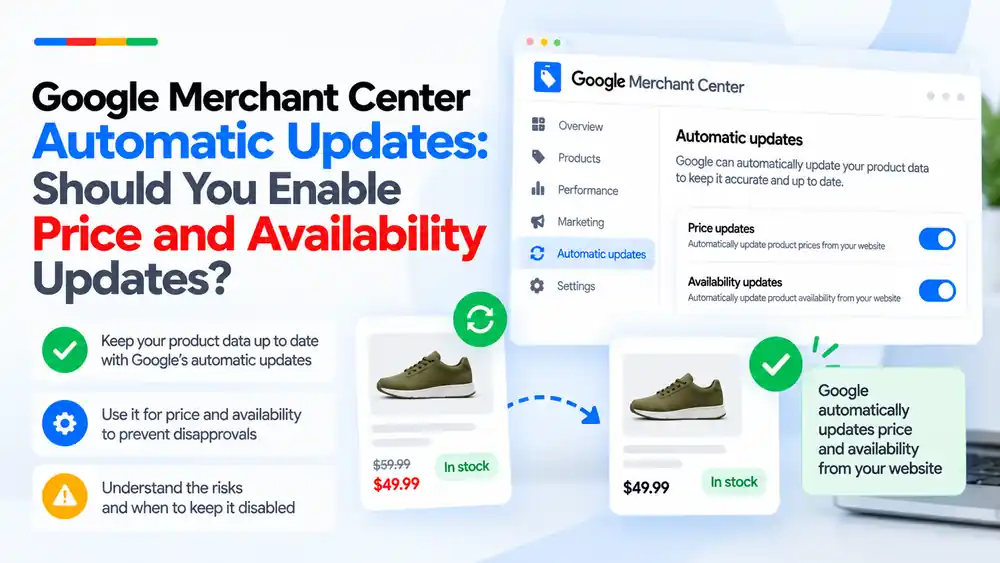
For most stores, yes: keep automatic price and availability updates turned on. Google uses the structured data and content on your product pages to correct occasional mismatches in Shopping ads and free listings, which helps avoid some disapprovals. But it is a safety net, not a fix. It does not replace an accurate, frequently updated feed, and it can pick the wrong value on pages with complex pricing. Keep it on, fix the feed, and check that your product pages show one clear price and stock status.
Last updated: 6 October 2026 · By Ashraful Islam, founder of GMC Fixer
Price and availability mismatches are among the most common product issues in Merchant Center. In 5+ years of working on Merchant Center accounts, we are often asked whether Google’s automatic updates solve the problem. They help, but only if you understand what they do and where they fall short. This guide explains how automatic updates work, when to keep them on, and when they can cause trouble.
What automatic updates are
Automatic updates, shown as Automations in Merchant Center, allow Google to update certain product details in Shopping ads and free listings based on what it finds on your website. According to Google, they can update:
- Price and sale price
- Availability, such as in stock or out of stock
- Condition, such as new or used
Google reads the structured data markup on your product pages first. If the markup is missing, incomplete or incorrect, it uses its own data extractors to find the information on the page. Google also notes that it may update strikethrough prices.
Where to find the setting
In Merchant Center, go to Products and open the Automations tab. Google says these automations should already be turned on, and you can switch them on or off for each type of update. Menu names change from time to time, so if you cannot see the tab, search for “automations” in Merchant Center Help.
Benefits of keeping them on
- Fewer short-lived mismatches. If a price changes on your site before your feed updates, Google can correct the listing instead of disapproving it.
- More accurate listings for shoppers. Customers are less likely to see a price or stock status that does not match your site.
- Less manual work for small, occasional changes between feed updates.
Risks and limitations
- It is not a replacement for your feed. Google is clear that automations only help with occasional problems and that you should keep updating your product data.
- Frequent changes can still cause disapprovals. If prices or availability change more than about once a day, Google may disapprove the product instead of updating it.
- Wrong values can be picked up. Pages with several prices, such as variants, bundles, member prices, subscriptions or prices in a different currency, can confuse the extractors.
- It hides the real problem. If your feed is wrong, automatic updates may mask it in some listings while the mismatch still appears elsewhere.
- It does not fix policy issues. Misrepresentation, missing business information or unclear policies are not solved by automatic updates.
Should you enable them?
| Situation | Recommendation | Why |
|---|---|---|
| Simple store with one clear price per page | Keep on | Low risk and helps with timing gaps |
| Prices or stock change several times a day | Keep on, but update the feed more often | Automations may not keep up |
| Variants with different prices on one URL | Keep on only if structured data is correct for each variant | Extractors can pick the wrong price |
| Member, wholesale or login-only prices | Review carefully | The public price may differ from what Google should show |
| Frequent wrong updates in diagnostics | Fix structured data first, then decide | Turning it off without fixing the page will not stop mismatches |
How to make automatic updates work properly
- Add correct structured data to product pages with price, currency and availability that match the visible page.
- Show one clear price per product page, or make each variant URL show its own price.
- Keep your feed fresh. Schedule feed fetches or use a content API or app sync so changes reach Merchant Center quickly.
- Check diagnostics regularly for price and availability issues and for updates you did not expect.
- Fix the source, not just the symptom. If Google keeps correcting the same products, your feed or site is out of sync.
For more detail on mismatches, read our guides on price mismatch and availability mismatch.
Quick checklist
- Automations are on in Products, under the Automations tab
- Product pages include accurate structured data
- Each page shows one clear price and stock status
- Sale and strikethrough prices are genuine and match the feed
- Feed is updated at least daily, or more often for fast-changing stores
- Diagnostics are checked for repeated automatic corrections
What not to do
- Do not rely on automatic updates instead of fixing your feed.
- Do not turn them off just to hide mismatches. That usually leads to more disapprovals.
- Do not show fake or inflated strikethrough prices. Google may update to them, and they can create misrepresentation risks.
- Do not expect automatic updates to lift an account suspension.
Automatic updates vs feed fixes
| Area | Automatic updates | Fixing the feed |
|---|---|---|
| What changes | Listings in Shopping ads and free listings | Your source product data |
| Best for | Occasional, short-lived mismatches | Ongoing accuracy |
| Handles frequent changes | Not reliably | Yes, with frequent updates |
| Fixes policy problems | No | No, needs website and policy fixes |
| Recommended | Yes, as a safety net | Yes, always |
Related reading: shipping mismatch and product feed errors.
How GMC Fixer approaches price and availability issues
We look at the feed, the product pages, structured data and Merchant Center settings together. Automatic updates stay on as a safety net while we fix the source of each mismatch, so listings stay accurate and reviewers see a store they can trust. Learn more about our Google Merchant Center suspension fix service.
FAQ
What are automatic updates in Google Merchant Center?
They are automations that let Google update the price, sale price, availability and condition of your products in Shopping ads and free listings, using structured data and other product information Google finds on your landing pages.
Should I turn on automatic price and availability updates?
For most stores, yes. Google says the automations should already be on, and they help avoid some price and availability mismatches. Keep them on while you make sure your feed is accurate and updated regularly.
Do automatic updates prevent Merchant Center suspensions?
No. They can reduce some product-level mismatches, but they do not fix misrepresentation, policy or trust problems. Google also says automations are not a replacement for regular updates of your product data.
Why are my products still disapproved for price mismatch with automatic updates on?
Automatic updates may not work for products whose price or availability changes very often, and Google may disapprove a product instead of updating it. Wrong structured data, variant prices or prices that only appear after login can also stop the update from working.
Where do I turn automatic updates on or off?
In Merchant Center, go to Products and open the Automations tab. You can switch the updates on or off for each attribute type.
Related guides
- Google Merchant Center Price Mismatch
- Google Merchant Center Availability Mismatch
- Google Merchant Center Shipping Mismatch
- Product Feed Errors and Google Shopping Suspensions
Get a free review of your account
If price or availability issues keep coming back in your Merchant Center account, send us the details and we will review your store and feed for free. Contact us here. We reply within 24 hours.
Leave a Reply