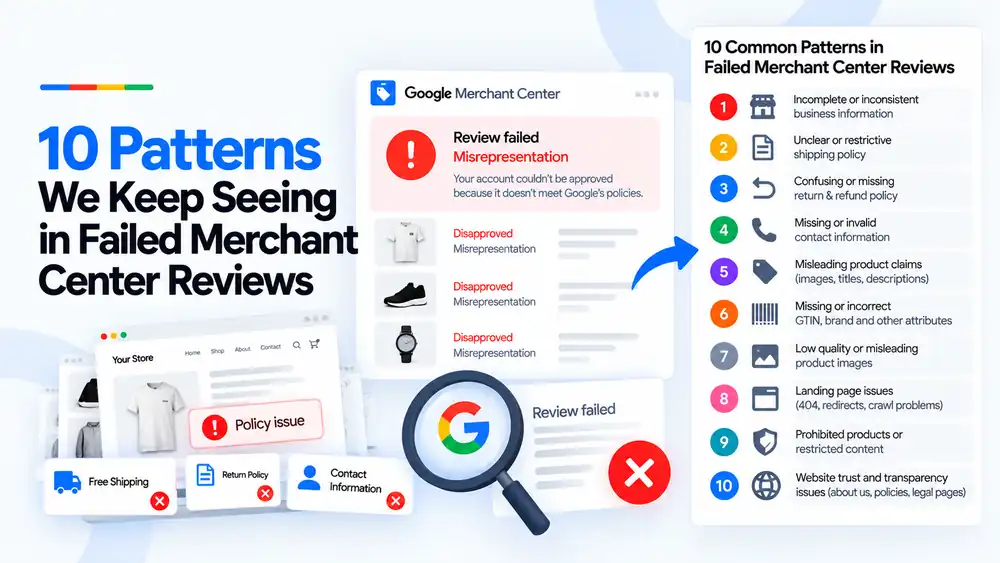
Most failed Merchant Center reviews come down to the same 10 patterns: incomplete business information, unclear shipping or return policies, missing contact details, misleading claims or images, bad product data, broken landing pages, restricted products and a site that does not look transparent. Reviews usually fail because one or more of these is still present somewhere on the site, even after the store owner fixed the obvious issue.
Last updated: 3 October 2026 · By Ashraful Islam, founder of GMC Fixer
When a store comes to us after a failed Merchant Center review, we look at what was fixed and what was missed. In 5+ years of doing this, the same 10 patterns keep showing up. Store owners usually fix the issue they expected to see, and leave one of these behind. Here they are, with what to change for each.
Why the same patterns keep causing failed reviews
A review is not a check of one page. Google looks at the whole store: business details, policies, products, claims and how the site works. The notice names a policy, often misrepresentation, but not the exact detail. So it is easy to fix one thing and miss another.
The 10 patterns at a glance
| Pattern | What we usually see |
|---|---|
| 1. Incomplete or inconsistent business information | The business name, address, phone or email is missing, or it differs between the site, the policy pages and Merchant Center. |
| 2. Unclear or restrictive shipping policy | No delivery times, no costs, or costs that differ from checkout and Merchant Center. Sometimes the policy limits shipping in ways the site never mentions. |
| 3. Confusing or missing return and refund policy | A template policy, no return window, or no explanation of who pays for returns and how refunds are paid. |
| 4. Missing or invalid contact information | Only a contact form, a phone number that does not work, or an email on a free domain with no other details. |
| 5. Misleading product claims | Titles or descriptions with claims the product cannot back up, fake “was” prices, countdown timers that reset, or badges that are not real. |
| 6. Missing or incorrect GTIN, brand and attributes | Missing GTINs, wrong brand values, or missing color, size, gender and age group attributes. |
| 7. Low quality or misleading product images | Blurry images, images with promotional text, or images that do not show the actual product being sold. |
| 8. Landing page issues | Product pages that return 404 errors, redirect somewhere unexpected, load slowly or are blocked from Google’s crawler. |
| 9. Prohibited products or restricted content | Products Google does not allow, or restricted products listed without meeting the requirements. |
| 10. Website trust and transparency issues | No About page, thin or copied legal pages, placeholder text or a site that looks unfinished. |
The 10 patterns and how to fix them
1. Incomplete or inconsistent business information
What we see: The business name, address, phone or email is missing, or it differs between the site, the policy pages and Merchant Center.
Fix: Use one set of business details everywhere. Add them to the footer, the Contact page, the About page and Merchant Center business info.
2. Unclear or restrictive shipping policy
What we see: No delivery times, no costs, or costs that differ from checkout and Merchant Center. Sometimes the policy limits shipping in ways the site never mentions.
Fix: State costs, times and regions clearly, and make them match checkout and your shipping settings. See shipping mismatch.
3. Confusing or missing return and refund policy
What we see: A template policy, no return window, or no explanation of who pays for returns and how refunds are paid.
Fix: Write a short, clear policy: how many days, item condition, return shipping costs, refund method and timing.
4. Missing or invalid contact information
What we see: Only a contact form, a phone number that does not work, or an email on a free domain with no other details.
Fix: Show at least two working ways to reach the business, and make sure they match your business information.
5. Misleading product claims
What we see: Titles or descriptions with claims the product cannot back up, fake “was” prices, countdown timers that reset, or badges that are not real.
Fix: Remove or rewrite anything you cannot prove. Every price, discount and claim should be accurate.
6. Missing or incorrect GTIN, brand and attributes
What we see: Missing GTINs, wrong brand values, or missing color, size, gender and age group attributes.
Fix: Fill in accurate product identifiers and attributes in the feed. See missing GTIN and missing brand.
7. Low quality or misleading product images
What we see: Blurry images, images with promotional text, or images that do not show the actual product being sold.
Fix: Use clear images of the real product, on a clean background, without overlays or watermarks.
8. Landing page issues
What we see: Product pages that return 404 errors, redirect somewhere unexpected, load slowly or are blocked from Google’s crawler.
Fix: Make sure every product link opens the right product page and that pages can be crawled. See landing page not working.
9. Prohibited products or restricted content
What we see: Products Google does not allow, or restricted products listed without meeting the requirements.
Fix: Remove prohibited items and check restricted categories against Google’s policies before requesting a review.
10. Website trust and transparency issues
What we see: No About page, thin or copied legal pages, placeholder text or a site that looks unfinished.
Fix: Add a real About page, complete legal pages and remove anything unfinished. See website needs improvement.
Before you request another review
- Check all 10 patterns. Don’t stop at the one named in the notice.
- Make business details consistent. Site, policy pages and Merchant Center should match.
- Rewrite shipping and return policies so they match how the store actually works.
- Clean up claims and images across banners, product pages and the feed.
- Fix product data and make sure every landing page works.
- Remove prohibited products and check restricted ones.
- Request the review only when everything is live.
Quick checklist
- Business name, address, phone and email consistent everywhere
- Shipping policy with costs, times and regions
- Return policy with window, conditions and refund method
- At least two working contact methods
- No unprovable claims, fake discounts or timers
- GTIN, brand and attributes complete
- Clear, accurate product images
- All landing pages load and can be crawled
- No prohibited or non-compliant restricted products
- About page and complete legal pages
For the full pre-review audit, use our Google Merchant Center suspension checklist.
What not to do
- Don’t request another review without changing anything.
- Don’t fix only the product data when the notice is about misrepresentation.
- Don’t add fake reviews, badges or a made-up address to look more trustworthy.
- Don’t open a new Merchant Center account to get around the suspension.
Patterns vs. one-off errors
| Recurring patterns | One-off errors | |
|---|---|---|
| Examples | Business info, policies, claims, trust signals | A single broken link or one wrong price |
| Where they show up | Across many pages of the site | On one page or one product |
| Effect on review | Often cause the whole review to fail | Usually cause item-level disapprovals |
If your review has already failed, read what to fix before requesting another review. For how often each issue appears, see common problems found in 100 suspended stores.
How GMC Fixer approaches failed reviews
We check every store against all 10 patterns, not just the one in the notice. Then we fix the gaps in order of impact and prepare the next review request only when the whole site is ready. Learn more about our Google Merchant Center suspension fix service.
FAQ
Why does my review keep failing when I fix what Google asked?
Google rarely tells you every problem. The notice names the policy, but the review checks the whole site. If even one of these patterns is still there, for example an old policy page or a misleading banner, the review can fail again.
Which pattern is the most common in failed reviews?
Incomplete or inconsistent business information. The name, address, phone or email is missing, or it differs between the website, the policy pages and Merchant Center.
Do I need to fix all 10 before requesting a review?
Fix every pattern that applies to your store. You may not have all 10, but you should check for all of them, because a review is a check of the whole site.
Can low quality images really cause a failed review?
Yes, if they mislead shoppers. Images that do not show the actual product, edited images that hide flaws or stock photos for a different item can count as misleading.
How long should I wait after fixing before requesting a review?
Make sure the changes are live and any cache is cleared first. Merchant Center may also show a waiting period after a failed review, so check when the next request is allowed.
Related guides
- Google Merchant Center Review Failed
- Common Problems Found in 100 Suspended Merchant Center Stores
- Misrepresentation Policy Violations Guide
- Google Merchant Center Suspension Checklist
- What We Learned From Reviewing Suspended Dropshipping Stores
- Google Merchant Center Review Failed: Why It Happens
- Google Merchant Center Review Button Disabled: What the Cooldown Period Means
- Google Merchant Center Product Page Blocked by Robots.txt: How to Fix Googlebot Access
- Google Merchant Center Automatic Updates: Should You Enable Them?
Get a free review of your account
Not sure which pattern is holding your review back? Send us your store details and we’ll check. We reply within 24 hours.
Leave a Reply