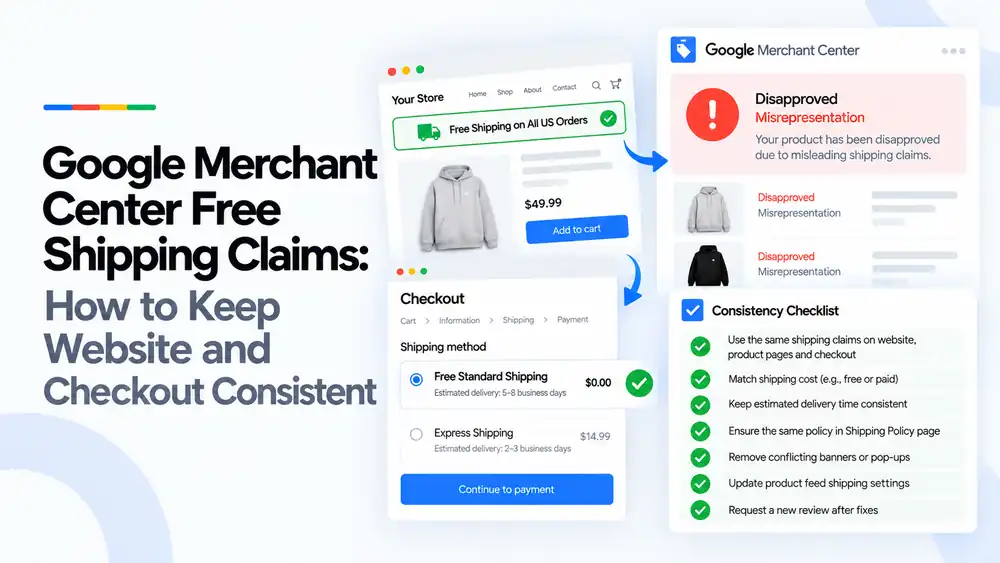
If your site says “free shipping” but checkout, your shipping policy or your Merchant Center shipping settings say something different, Google can treat it as a misleading claim. Make every place tell the same story: the same cost, the same conditions (minimum order, regions, eligible products) and the same delivery time, then request a review.
Last updated: 2 October 2026 · By Ashraful Islam, founder of GMC Fixer
“Free shipping” is one of the strongest words you can put on a store, and one of the easiest to get wrong. In 5+ years of fixing Merchant Center accounts, we’ve seen plenty of disapprovals and suspensions that came down to a single banner promising something the checkout didn’t deliver. This guide shows you how to find those gaps and close them.
What a misleading free shipping claim means
Google wants shoppers to get what your ad and landing page promise. If a shopper sees “Free Shipping on All US Orders” and then gets charged at checkout, or finds the offer only applies above $75, the claim was misleading. Google usually reports this as Misrepresentation – misleading shipping claims, or as a shipping mismatch at product level.
The fix is rarely to remove free shipping. It’s to make the claim accurate and identical everywhere it appears.
What Google checks
| Where | What Google compares |
|---|---|
| Site banners and pop-ups | Whether “free shipping” is stated with its real conditions (threshold, region, product types) |
| Product pages | Whether the shipping cost and delivery time shown match the claim |
| Checkout | Whether the cost a shopper actually pays matches the banner and the feed |
| Shipping policy page | Whether the written policy matches the offer and the checkout |
| Merchant Center shipping settings / feed | Whether the cost and transit time submitted to Google match the site |
Common causes
| Cause | Example |
|---|---|
| Missing threshold | Banner says “Free shipping”, but it only applies to orders over $50 |
| Missing region limit | “Free shipping” shown to all countries, but only US orders qualify |
| Product exclusions | Large or heavy items are charged shipping, but the sitewide banner doesn’t say so |
| Outdated promotion | A holiday free-shipping banner is still live after the offer ended |
| Conflicting delivery times | Banner says 2–3 days, checkout shows 5–8 business days |
| Feed not updated | Merchant Center still has a paid rate while the site advertises free shipping, or the other way round |
How to fix free shipping claims, step by step
- Use the same shipping claim everywhere. Write one exact wording, for example “Free standard shipping on US orders over $50”, and use it on banners, product pages, cart, checkout and emails.
- Match the shipping cost. If you say free, the eligible option must show $0.00 at checkout. If some orders pay, say so next to the claim.
- Keep the delivery time consistent. The estimate on product pages, checkout and your policy should match what you set in Merchant Center (for example 5–8 business days for free standard).
- Put the same policy on your Shipping Policy page. List the threshold, the regions, excluded products and each option’s cost and timing.
- Remove conflicting banners and pop-ups. Check announcement bars, exit pop-ups, app widgets and old promo images. One leftover claim can trigger the issue.
- Update your Merchant Center shipping settings. Set the free shipping threshold or $0 rate for the right regions and products, and use shipping labels if only some products qualify.
- Request a review. Test a real checkout first, then request a review from the Needs attention section.
Quick checklist
- One exact free shipping wording used across the site
- Threshold and region shown next to every claim
- Eligible option shows $0.00 at checkout
- Delivery times match on site, policy and Merchant Center
- Shipping Policy page updated
- No expired or conflicting banners or pop-ups
- Merchant Center shipping settings match the site
If you’re also seeing other issues, our suspension checklist covers the full set of checks to run before any review.
What not to do
- Don’t keep “Free shipping on all orders” when a threshold or region limit applies.
- Don’t set $0 shipping in Merchant Center while charging at checkout to make your ads look cheaper.
- Don’t bury the conditions in a footer link or tiny text.
- Don’t request a review before checking every page and the checkout yourself.
Free shipping claims vs. shipping mismatch
| Free shipping claim issue | Shipping mismatch | |
|---|---|---|
| Where it shows | Account-level misrepresentation, or a disapproval for misleading claims | Item-level disapproval for wrong shipping cost |
| Typical trigger | Promotional wording that doesn’t match reality | Feed or settings cost differs from checkout |
| Main fix | Make claims, policy and checkout consistent | Correct the shipping settings or feed values |
For item-level cost problems, see our guide to Google Merchant Center shipping mismatch. If your account was suspended for wider trust issues, read the misrepresentation guide.
How GMC Fixer approaches shipping claim issues
We audit every place your store talks about shipping, from the announcement bar to the checkout, then line them up with your policy and Merchant Center settings. We rewrite claims so they stay attractive but accurate, and prepare a clean review request. Learn more about our Google Merchant Center suspension fix service.
FAQ
Can Google suspend my account just for a free shipping banner?
Yes, if the banner doesn’t match what shoppers actually pay. A sitewide “free shipping” claim that turns into a paid fee at checkout, or that hides a minimum order, can be flagged as a misleading shipping claim under the misrepresentation policy.
Is it OK to offer free shipping only above a minimum order value?
Yes. Threshold offers are fine as long as the threshold is stated clearly next to the claim (for example “Free shipping on US orders over $50”) and the same threshold is set in your Merchant Center shipping settings.
Do I need to remove my express shipping option?
No. You can offer free standard shipping and paid express shipping together. Just make sure your claim says “free standard shipping” and that the free option really is $0 at checkout for eligible orders.
How do I set free shipping correctly in Merchant Center?
In your shipping settings, add a free shipping threshold or a $0 rate for the regions and products it applies to. If only some products qualify, use shipping labels or the shipping attribute so the feed matches your site.
How long does a review take after fixing shipping claims?
Most reviews finish within a few business days, though some take longer. Check every page and the checkout yourself before you request the review, because repeated failed reviews can lead to longer waiting periods.
Related guides
- Google Merchant Center Shipping Mismatch
- Misrepresentation Policy Violations Guide
- Google Merchant Center Price Mismatch
- Google Merchant Center Suspension Checklist
- Google Merchant Center Review Failed
- Common Problems Found in 100 Suspended Merchant Center Stores
- 10 Patterns We Keep Seeing in Failed Merchant Center Reviews
- What We Learned From Reviewing Suspended Dropshipping Stores
- Google Merchant Center Review Failed: Why It Happens
- Google Merchant Center Review Button Disabled: What the Cooldown Period Means
- Google Merchant Center Product Page Blocked by Robots.txt: How to Fix Googlebot Access
- Google Merchant Center Automatic Updates: Should You Enable Them?
Get a free review of your account
Not sure which claim is causing the problem? Send us your store details and we’ll point out the conflicts. We reply within 24 hours.
Leave a Reply