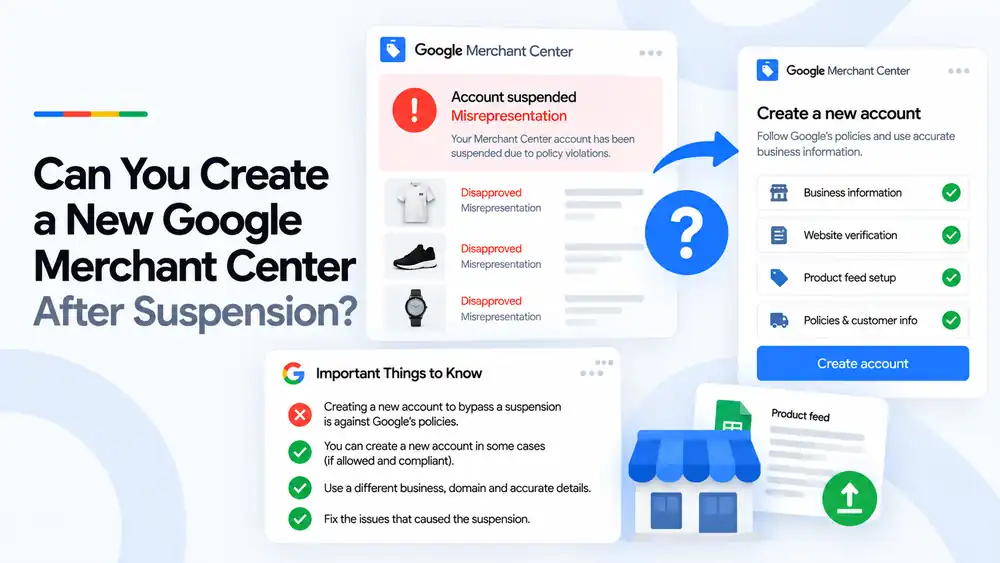
Creating a new Google Merchant Center account to get around a suspension is against Google’s policies. Google treats it as circumventing its systems, and it can lead to the new account, the old account and related accounts being suspended. A new account is only appropriate for a genuinely different, unrelated business. For the same business, the right path is to fix the issues on your website and product data, then request a review of the existing account.
Last updated: 1 October 2026 · By Ashraful Islam, founder of GMC Fixer
One of the most common questions we hear after a suspension is whether it is easier to start again with a new Merchant Center account. It is an understandable thought, but it is usually the worst option. Over 5+ years of recovery work, we have seen many merchants turn a fixable suspension into a much harder one by opening new accounts. This guide explains what Google allows, what it does not, and what to do instead.
What Google says about new accounts after a suspension
Google’s policies do not allow merchants to create new accounts to get around a suspension or other enforcement. This is treated as circumventing Google’s systems. Google looks at the business behind an account, not only the email address or domain, and it can connect new accounts to suspended ones.
When a new account is and is not appropriate
| Situation | New account appropriate? | Why |
|---|---|---|
| Same business, same products, account suspended | No | This is circumventing the suspension |
| Same business with a new domain or new email | No | The business is still the same merchant |
| Same business rebranded after a suspension | No | A rebrand does not make it a different merchant |
| A genuinely separate business with its own website and details | Yes | It is a different merchant |
| An agency managing clients through a multi-client account | Yes | Each client is its own business |
Risks of opening a new account to get around a suspension
- The new account can be suspended for circumventing systems.
- The original suspension can become harder to reverse.
- Related accounts, including linked Google Ads accounts, can be affected.
- Suspensions for circumventing systems are among the hardest to appeal.
- You lose time and ad spend on an account that may not last.
What to do instead, step by step
- Read the suspension reason. Open Merchant Center and note the exact policy and any examples Google gives.
- Fix the issues that caused the suspension. Update your website, policies, business information and product data.
- Check business information. Make sure your name, address and contact details are accurate and match Merchant Center.
- Verify your website and feed. Confirm the website is claimed and the product feed matches the live store.
- Request a review. Only once everything is fixed, and keep the store stable during the review.
- If the review fails, read the new reason. Fix what remains before requesting another review.
A quick checklist before requesting a review
- Exact suspension reason identified
- Business name, address and contact details shown and accurate
- Shipping, returns, privacy and terms pages complete
- Product data matches the website
- No misleading claims, fake reviews or timers
- Website verified and claimed in Merchant Center
- No new accounts opened for the same business
For a full pre-review list, see our Google Merchant Center suspension checklist.
What not to do
- Do not open a new account for the same business to get around a suspension.
- Do not change your domain or email hoping Google will not notice.
- Do not request reviews repeatedly without making changes.
- Do not delete the suspended account to start again.
- Do not hide or change business details to look like a different merchant.
Fixing the existing account vs. opening a new one
| Fix and request a review | Open a new account | |
|---|---|---|
| Policy compliant | Yes | No, for the same business |
| Risk of further suspension | Low once issues are fixed | High |
| Effect on the original account | Can be reinstated | Can make reinstatement harder |
| Long-term result | A stable, compliant account | An account that may be suspended at any time |
To understand what happens after you request a review, read our guide to Merchant Center reinstatement.
How GMC Fixer approaches suspended accounts
We do not help merchants open new accounts to get around a suspension. We help you fix the original account: we find the cause, correct your website, policies and product data, and prepare the account for review. This is the core of our Google Merchant Center suspension fix service.
Frequently asked questions
Can I create a new Merchant Center account after my account was suspended?
Not for the same business. Opening a new account to bypass a suspension is treated as circumventing Google’s systems, which is a serious policy violation. A new account is only appropriate for a genuinely separate business with its own website and details.
What happens if Google finds a new account linked to a suspended one?
Google can suspend the new account, and repeated attempts can make the original suspension harder to reverse. Suspensions for circumventing systems are among the hardest to appeal.
Will a new domain or new email get around the suspension?
Changing the domain, email or account details does not change the business behind it. If the business, products and people are the same, Google can still treat it as the same merchant. The safer option is to fix the issues and request a review.
How do I get my existing account reinstated instead?
Find the exact reason in Merchant Center, fix every issue on your website, policies and product data, then request a review. If the first review fails, read the reason carefully, fix what remains and try again.
When is a new Merchant Center account legitimate?
When it is for a different business, such as a separate company with its own website, products and business details, that is not being used to continue selling as the suspended merchant.
Related guides
- Google Merchant Center reinstatement: what to expect
- Google Merchant Center suspension checklist
- Why Google Merchant Center suspends accounts
- Google Merchant Center misrepresentation suspension: how to fix it
- Google Merchant Center landing page not working: how to fix URL and crawl issues
- Google Merchant Center Free Shipping Claims
- Google Merchant Center Review Failed
- Common Problems Found in 100 Suspended Merchant Center Stores
- 10 Patterns We Keep Seeing in Failed Merchant Center Reviews
- What We Learned From Reviewing Suspended Dropshipping Stores
- Google Merchant Center Review Failed: Why It Happens
- Google Merchant Center Review Button Disabled: What the Cooldown Period Means
- Google Merchant Center Product Page Blocked by Robots.txt: How to Fix Googlebot Access
- Google Merchant Center Automatic Updates: Should You Enable Them?
Get a free review of your account
If your Merchant Center account has been suspended and you are not sure what to do next, send us your store URL and a screenshot of the issue. We will tell you what is causing it and how to fix it, and we reply within 24 hours.
Leave a Reply