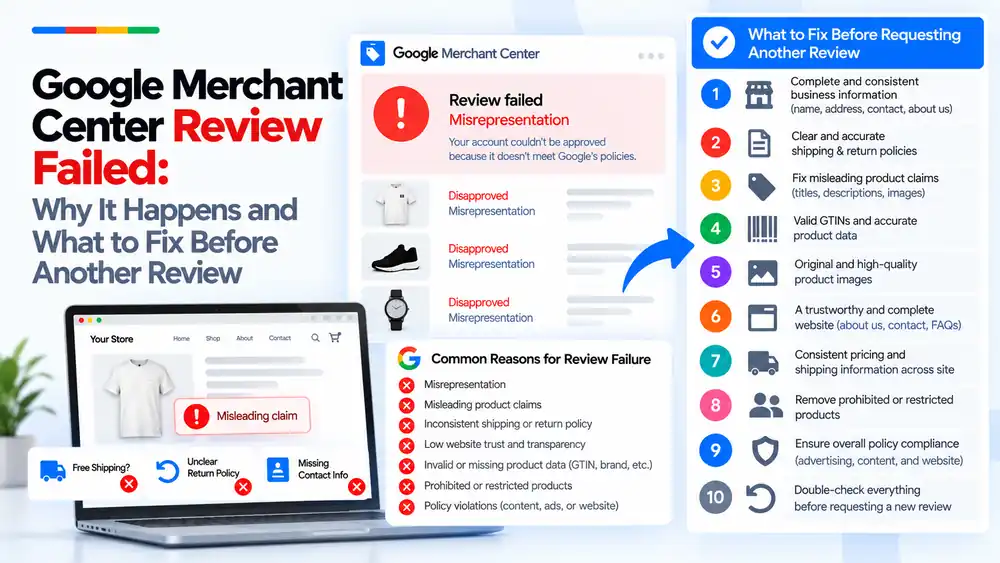
A Google Merchant Center review usually fails because the reviewer still sees the same trust problem that caused the suspension: unclear business details, misleading product claims, policies that contradict each other, or product data that does not match the website. Google does not list every issue it finds, so a review fails when only the obvious error was fixed. Find the root cause, fix it across the website, feed and ads, then request one well-prepared review.
Last updated: 6 October 2026 · By Ashraful Islam, founder of GMC Fixer
A failed review is frustrating because it often comes after real work on the store. In 5+ years of fixing Merchant Center accounts, we have found that most failed reviews are not caused by a single missed setting. They happen because the reviewer still sees a reason not to trust the store. This guide explains why reviews fail, what Google is actually looking at, and what to fix before you try again.
If you already know the causes and want the full fix process, read our step-by-step guide: Google Merchant Center review failed: what to fix before requesting another review.
What “review failed” actually means
When you request a review, Google checks whether the store now meets its policies. If it does not, the account stays suspended and you see a message such as “Review failed” alongside a policy name, most often misrepresentation. Product-level disapprovals may also stay in place.
The important point is that the message tells you the policy area, not the exact problem. A reviewer may have looked at your About page, checkout, policies, product pages and feed. Any one of them can be enough to fail the review.
Why Merchant Center reviews fail: the common root causes
1. Misrepresentation that was only partly fixed
Misrepresentation covers anything that could mislead a customer about who you are or what you sell. Stores often fix one obvious item, such as a fake discount, but leave other signals in place. Our misrepresentation policy guide explains what reviewers check.
2. Misleading product claims
Titles, descriptions and images that promise more than the product delivers are a common trigger. Examples include “best in the world”, unsupported health or performance claims, “free shipping” that is not free at checkout, or images that show a different product or extra items.
3. Inconsistent shipping or return policies
If the homepage says one thing, the shipping policy says another and Merchant Center settings say a third, the reviewer cannot trust any of them. The same applies to return windows and refund terms. See our guides on shipping mismatch and free shipping claims.
4. Low website trust and transparency
Missing business name or address, a contact form with no other way to reach you, an About page with no real information, unfinished pages or fake reviews all reduce trust. Our guide to website needs improvement covers these signals.
5. Invalid or missing product data
Invented brands, made-up GTINs, wrong prices or stock status, and missing attributes make the feed look unreliable. See invalid GTIN, missing brand and price mismatch.
6. Prohibited or restricted products
One restricted item left in the catalogue can be enough for a review to fail, even if the rest of the store is clean. This is especially common in stores that import supplier catalogues in bulk.
7. Policy violations outside the store
Reviewers can also take ads, landing pages and other content into account. If an ad promises something the website does not, or a landing page breaks the rules, the review can fail even when the product pages look fine.
Root causes at a glance
| Reason | What the reviewer sees | Typical example |
|---|---|---|
| Misrepresentation | The store may mislead customers about who it is or what it sells | Fake “50% off” banners, warehouse claims with no warehouse |
| Misleading product claims | Promises the product cannot back up | “Clinically proven” with no evidence |
| Inconsistent policies | Different terms on different pages | Free shipping on the homepage, paid shipping at checkout |
| Low trust and transparency | No clear owner, contact or business details | Contact form only, no address or email |
| Invalid product data | Feed data that does not match reality | Made-up GTINs or the wrong price |
| Restricted products | Items that break Shopping policies | Replica or regulated products |
| Other policy violations | Problems in ads or landing pages | Ad claims that differ from the website |
What to fix before requesting another review
Use this as a quick checklist. Each point should be true across the website, the product feed and your ads.
- Complete and consistent business information: name, address, contact details and a real About page.
- Clear and accurate shipping and return policies: easy to find and identical everywhere.
- No misleading product claims in titles, descriptions or images.
- Valid GTINs and accurate product data, or identifiers left out correctly where none exist.
- Original, high-quality product images that show the real item.
- A trustworthy, complete website with working About, Contact and FAQ pages.
- Consistent pricing and shipping information across the site, feed and checkout.
- No prohibited or restricted products in the catalogue.
- Overall policy compliance across ads, content and website.
- A final double-check of everything before you request a new review.
For the detailed version, use our Google Merchant Center suspension checklist.
What not to do after a failed review
- Do not request another review straight away without making real changes.
- Do not fix only the item you think caused the problem and ignore the rest of the store.
- Do not open a new account to get around the suspension. Read why in our guide to a new Merchant Center account after suspension.
- Do not add trust badges, guarantees or reviews that are not genuine.
- Do not change policies on the website without updating Merchant Center settings to match.
Quick fix vs complete fix
| Area | Quick fix that often fails | Complete fix that passes review |
|---|---|---|
| Business details | Add an email to the footer | Full business identity on About, Contact and policies |
| Policies | Edit the shipping page only | Align policies, checkout and Merchant Center settings |
| Products | Fix the flagged product | Audit every product, image and claim |
| Feed | Re-upload the same feed | Correct identifiers, prices and availability |
| Review request | Request again the same day | Request once, after a full audit |
We see the same patterns again and again. For more detail, read 10 patterns we keep seeing in failed Merchant Center reviews and common problems found in suspended stores.
How GMC Fixer approaches failed reviews
When a review fails, we start by finding the root cause rather than guessing. We audit the website, product feed, Merchant Center settings and ads, list every issue a reviewer could flag, and fix them in the right order. Only then do we prepare a single, strong review request. Learn more about our Google Merchant Center suspension fix service.
FAQ
Why did my Merchant Center review fail if I fixed the issue?
Usually because the fix was partial. Google often names one policy, such as misrepresentation, but the reviewer checks the whole store. If business details, policies, product claims or feed data still raise trust concerns anywhere on the site, the review can fail again.
Does Google tell you exactly what to fix after a failed review?
Not usually. The notice names the policy area, not a list of pages or products. That is why it helps to audit the full website, product feed and ads rather than only the item you think triggered the suspension.
How long should I wait before requesting another review?
Only request another review when every issue is fixed. After repeated failed reviews Google can apply a waiting period before you are allowed to request again, so one complete request is better than several quick ones.
Is misrepresentation the most common reason a review fails?
It is one of the most common labels on failed reviews, because it covers trust problems such as missing business information, misleading claims and unclear policies. The underlying cause is different for every store, which is why each one needs its own audit.
Can I fix a failed review by opening a new Merchant Center account?
No. Creating a new account to get around a suspension can be treated as circumventing Google’s systems and may make the situation worse. Fix the original account and request review there.
Related guides
- Google Merchant Center Review Failed: What to Fix Before Requesting Another Review
- 10 Patterns We Keep Seeing in Failed Merchant Center Reviews
- Misrepresentation Policy Violations Guide
- Google Merchant Center Reinstatement: What to Expect
- Google Merchant Center Review Button Disabled: What the Cooldown Period Means
- Google Merchant Center Product Page Blocked by Robots.txt: How to Fix Googlebot Access
- Google Merchant Center Automatic Updates: Should You Enable Them?
Get a free review of your account
If your Merchant Center review has failed, send us the details and we will review your store and account for free. Contact us here. We reply within 24 hours.
Leave a Reply