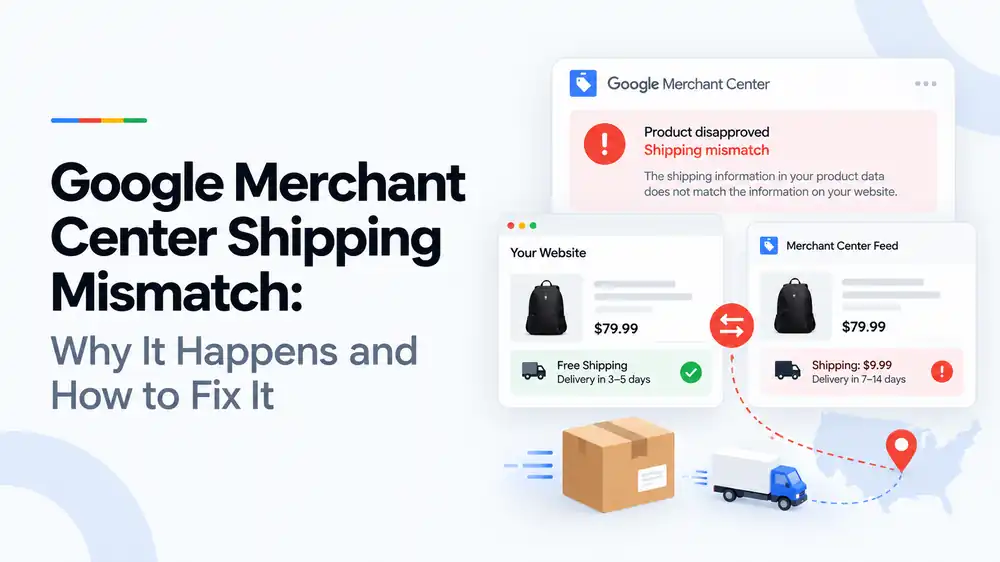
A Google Merchant Center shipping mismatch means the shipping cost or delivery time in your Merchant Center settings or product data does not match what shoppers see on your website or at checkout. The usual causes are outdated shipping settings, free shipping thresholds that differ, carrier-calculated rates, and delivery times that leave out handling time. Fix it by making Merchant Center, your shipping policy page and checkout show the same costs and times, then let Google recheck your products.
Last updated: 1 October 2026 · By Ashraful Islam, founder of GMC Fixer
Shipping mismatch is one of the most frustrating Google Merchant Center issues because the problem often is not on the product page at all. It sits in your shipping settings, your shipping policy, your checkout rules or your carrier app. If your website promises free shipping in 3 to 5 days but Merchant Center says $9.99 and 7 to 14 days, Google will disapprove the products. This guide explains why shipping goes out of sync, what Google compares, and how to fix it, based on 5+ years of Merchant Center work.
What a shipping mismatch means
Google shows shipping cost and delivery time next to your products, so it needs that information to be accurate. When the shipping cost or delivery time in Merchant Center does not match what Google finds on your website or at checkout, it flags the affected products, often as an incorrect or mismatched shipping cost, and stops showing them.
Shipping is also something Google’s reviewers look at closely during account reviews. Shipping costs that only appear at checkout, or delivery promises the store cannot keep, can be treated as misleading shoppers under the misrepresentation policy, which affects the whole account.
What Google compares
| Source | What Google reads | What must match |
|---|---|---|
| Merchant Center shipping settings | Rates, free shipping thresholds, countries and delivery times you set in the account | What shoppers actually pay and how long delivery really takes |
| Product feed | The shipping, shipping_label and weight attributes, if you use them | The same rules as your settings and website |
| Shipping policy page | The costs, thresholds, countries and delivery times you publish | The same values as Merchant Center and checkout |
| Checkout | The shipping cost charged for the product and destination | The cost shown in your Google listing |
Common causes of shipping mismatch
| Cause | What happens | How to fix it |
|---|---|---|
| Outdated shipping settings | You changed rates on the site but not in Merchant Center | Update Merchant Center every time your shipping rates change |
| Free shipping threshold | The site offers free shipping over $50 but Merchant Center uses a different threshold, or none | Set the same minimum order value for free shipping everywhere |
| Carrier-calculated rates | Checkout uses live carrier rates but Merchant Center uses a flat rate | Use carrier-calculated rates in Merchant Center or switch the site to matching flat rates |
| Weight-based rates | Products are missing weight, so the wrong rate applies | Add accurate shipping weights to products and the feed |
| Delivery time | Merchant Center shows transit time only and leaves out handling time | Set handling time plus transit time, and your order cutoff time |
| Product groups | Heavy or oversized items cost more to ship but use the standard rate | Use shipping_label to give these products their own rates |
| Countries | You ship to a country in Merchant Center that the site does not support, or the reverse | Match the countries in Merchant Center with your checkout and shipping policy |
How to fix a shipping mismatch, step by step
- Open the issue in Merchant Center. Note which products and countries are affected and what shipping cost Google expected.
- Test a real order. Add an affected product to the cart, enter an address in the target country and note the shipping cost and delivery estimate.
- Compare with Merchant Center. Check the shipping settings and any shipping values in your feed for the same product and country.
- Check your shipping policy page. Make sure it shows the same costs, threshold, countries and delivery times.
- Fix the source. Update Merchant Center settings, feed rules, product weights or checkout rules so all three match.
- Set realistic delivery times. Include handling time, transit time and cutoff time based on your real performance.
- Let Google recheck. Most product errors clear after the next crawl. If the account received a warning or suspension, request a review only when everything matches.
A quick shipping checklist
- Shipping cost in Merchant Center matches checkout for each country
- Free shipping threshold is the same in Merchant Center, the site and checkout
- Delivery times include handling and transit time
- Shipping policy page shows the same costs, countries and delivery times
- Heavy or special items use their own shipping labels and rates
- Product weights are correct if rates depend on weight
- No extra fees appear for the first time at checkout
Shipping is one of the trust signals Google checks, so also read our guide to the “website needs improvement” notice.
What not to do
- Do not promise faster delivery than you can meet just to look competitive.
- Do not set shipping to free in Merchant Center if checkout charges for it.
- Do not add handling or service fees that only appear at the last step.
- Do not change only the feed and forget the account shipping settings, or the reverse.
- Do not request reviews repeatedly before Merchant Center, the site and checkout match.
Shipping mismatch vs. a misrepresentation suspension
| Shipping mismatch | Misrepresentation suspension | |
|---|---|---|
| Level | Usually product-level disapprovals | Account-level suspension |
| Cause | Shipping settings, policy and checkout do not match | Overall trust and transparency problems, which can include misleading shipping |
| Risk | Can escalate if costs or delivery promises mislead shoppers | All products stop showing |
| Fix | Align settings, policy page and checkout | Full audit of business, site and feed, then a review |
Price and stock often go out of sync for similar reasons, so see our guides to price mismatch and availability mismatch.
How GMC Fixer approaches shipping issues
We compare your Merchant Center shipping settings, feed values, shipping policy page and real checkout results for each country you sell to. We then rebuild the shipping setup so costs, thresholds and delivery times match everywhere, and make sure your delivery promises are realistic. This is part of our Google Merchant Center suspension fix service, and it works whether you have a few disapproved products or a suspended account.
Frequently asked questions
What does shipping mismatch mean in Google Merchant Center?
It means the shipping cost or delivery time Google has for your products, from your Merchant Center shipping settings or the shipping attribute in your feed, is different from what shoppers see on your website or at checkout. Google disapproves affected products because the ad would show the wrong total cost or delivery promise.
Where does Google get my shipping information from?
Mostly from the shipping settings in your Merchant Center account, which set rates and delivery times by country. You can also send shipping in the product feed. If both exist, the feed value usually overrides the account settings for that product, so both need to be correct.
Can a shipping mismatch get my account suspended?
Usually it leads to product disapprovals. But unrealistic delivery promises or shipping costs that only appear at checkout can be treated as misleading shoppers, which can lead to a misrepresentation warning or suspension.
How do I set delivery times correctly?
Add your handling time, the days you need to prepare and dispatch an order, plus the carrier’s transit time. Use your real averages, set your order cutoff time, and show the same total delivery time on your shipping policy page.
Does my shipping policy page need to match Merchant Center?
Yes. Google and its reviewers compare your shipping policy page with your Merchant Center settings and checkout. Costs, free shipping thresholds, countries and delivery times should be the same in all three places.
Related guides
- Google Merchant Center price mismatch: causes and fixes
- Google Merchant Center availability mismatch: how to fix it
- Google Merchant Center website needs improvement: how to fix it
- Google Merchant Center suspension checklist
- Google Merchant Center missing GTIN: when you need it and how to fix it
- Google Merchant Center invalid GTIN: causes, examples and fixes
- Google Merchant Center missing brand attribute: how to fix product disapprovals
- Google Merchant Center missing color, gender and age group: complete apparel fix guide
- Google Merchant Center Shopify suspension: complete fix checklist
- Google Merchant Center WooCommerce suspension: what to check before review
- Google Merchant Center dropshipping suspension: compliance guide for 2026
- Can you create a new Google Merchant Center account after suspension?
- Google Merchant Center landing page not working: how to fix URL and crawl issues
- Google Merchant Center Free Shipping Claims
- Google Merchant Center Review Failed
- Common Problems Found in 100 Suspended Merchant Center Stores
- 10 Patterns We Keep Seeing in Failed Merchant Center Reviews
- What We Learned From Reviewing Suspended Dropshipping Stores
- Google Merchant Center Review Failed: Why It Happens
- Google Merchant Center Review Button Disabled: What the Cooldown Period Means
- Google Merchant Center Product Page Blocked by Robots.txt: How to Fix Googlebot Access
- Google Merchant Center Automatic Updates: Should You Enable Them?
Get a free review of your account
If Merchant Center is flagging shipping mismatches on your products, send us your store URL and a screenshot of the issue. We will tell you what is causing it and what fixing it involves, and we reply within 24 hours.
Leave a Reply