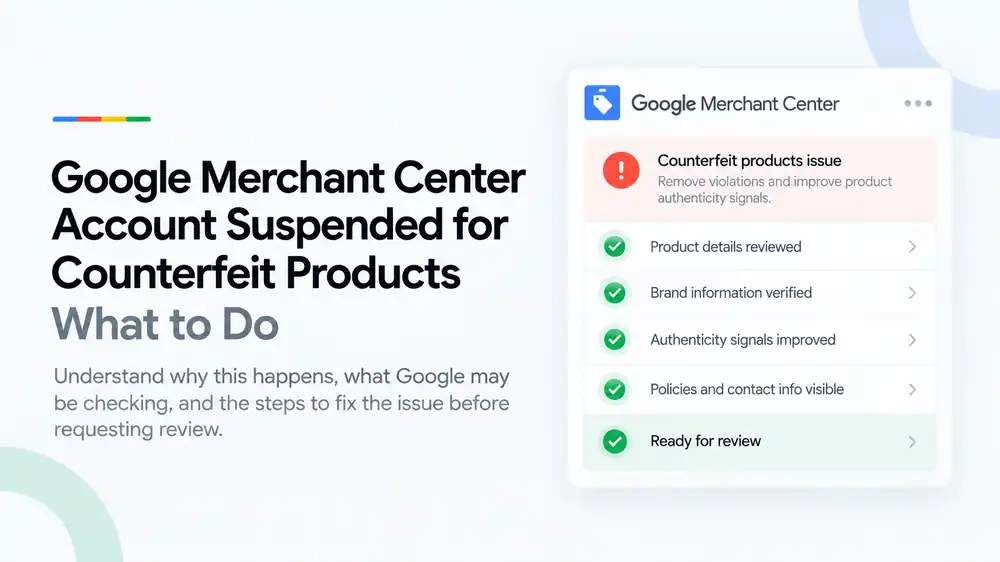
A counterfeit products suspension means Google believes your store sells items that copy another brand’s trademarks or logos to pass as genuine. Google treats this as a serious violation, so it can suspend without warning. If you sell genuine products, remove anything questionable, fix brand and product data, gather proof of authenticity such as supplier invoices, and then appeal. If any items are fake, the only fix is to remove them for good.
Last updated: 1 October 2026 · By Ashraful Islam, founder of GMC Fixer
A counterfeit products suspension is one of the hardest Google Merchant Center issues to face. Google treats it as a serious violation, it often arrives without a warning, and the account can stay suspended if the appeal is weak. Many of the stores we see are not selling fakes at all. Their listings simply look risky to Google. This guide explains what the counterfeit policy covers, why genuine stores get caught, and how to prepare a store and an appeal properly, based on 5+ years of Merchant Center work.
What the counterfeit products suspension means
Google does not allow the sale of counterfeit goods: products that carry a trademark or logo identical to, or hard to tell apart from, another brand’s, in a way that copies the brand to pass the item off as genuine. When Google decides a store breaks this policy, it usually suspends the whole Merchant Center account, so all products stop showing in Shopping ads and free listings.
Because Google treats counterfeit goods as an egregious violation, it can suspend immediately rather than giving the warning period it uses for many other issues. That also makes the appeal more important: you usually need to show clearly that the products are genuine, not just change a few listings.
What Google may be checking
| Signal | What Google may notice | How to fix it |
|---|---|---|
| Product details | Titles, descriptions or images that use a brand name or logo on items that are not that brand | Use brand names only on genuine branded products and describe unbranded items honestly |
| Pricing | Premium brands sold far below their usual market price | Price genuine items realistically and remove listings you cannot justify |
| Risky wording | Words like “replica”, “1:1”, “AAA quality”, “mirror”, “dupe” or “inspired by [brand]” | Remove this wording from titles, descriptions, images, URLs and ads |
| Brand information | Missing, wrong or inconsistent brand, GTIN and MPN in the product feed | Submit the correct brand, GTIN and MPN for every branded product |
| Authenticity signals | No information on where products come from, no About page, no returns process | Explain your sourcing, show business details and offer clear returns |
| Policies and contact info | Hidden contact details, missing policies, a store that looks temporary | Show contact details and full policies so shoppers and reviewers can trust the business |
Why genuine stores get flagged
Most counterfeit flags we review come from listing patterns, not from stores knowingly selling fakes. The most common ones are:
- Compatible accessories, such as phone cases or chargers, that use the device brand’s logo or name as if they were made by that brand
- Resellers of genuine products with no brand, GTIN or MPN in the feed
- Big discounts on luxury or designer brands, which look like a typical counterfeit pattern
- Supplier images and descriptions copied from marketplaces where fakes are common
- “Inspired by” or “dupe” wording used for marketing
- Used, refurbished or grey-import items that are not clearly labelled with their condition
If you sell compatible products, say “compatible with” the brand, keep the other brand’s logo out of your images, and list your own brand (or the real manufacturer) in the brand field.
What to do after a counterfeit suspension, step by step
- Do not appeal straight away. A rushed appeal that fails can lead to longer waiting periods before you can ask again.
- Read the notice and policy. Note the exact policy named in Merchant Center and any products it highlights.
- Audit every branded product. List each product that carries a brand name or logo and check that you can prove it is genuine.
- Remove anything you cannot prove. If you are unsure about a product’s authenticity, take it down from the site and the feed. If any items are fake, remove them permanently.
- Clean up wording and images. Remove “replica”, “1:1”, “inspired by” and similar terms, and remove brand logos from unbranded or compatible items.
- Fix product data. Make sure brand, GTIN, MPN and condition are correct in your feed and match the product pages.
- Gather proof of authenticity. Collect invoices from the brand or its authorized distributors, and any authorization or reseller letters.
- Improve trust signals. Show contact details and full policies, and explain on your About page where your products come from.
- Submit one clear appeal. Explain what you checked, what you removed or changed, and how you source genuine products. Attach or reference your proof.
A quick pre-appeal checklist
- Product details reviewed: every branded product can be traced to a genuine source
- Brand information verified: correct brand, GTIN and MPN in the feed
- Authenticity signals improved: sourcing explained, realistic prices, no risky wording
- Policies and contact info visible on every page
- Questionable or fake products removed from both the site and the feed
- Supplier invoices and authorization letters ready to share
For the wider account, feed and website checks, use our Google Merchant Center suspension checklist.
What not to do
- Do not open a new Merchant Center account to keep selling. Google can link accounts and may treat it as circumventing its systems.
- Do not simply rename products or blur logos while keeping the same items. That does not make them genuine.
- Do not submit edited, borrowed or fake invoices. This can end any chance of reinstatement.
- Do not claim to be an authorized dealer unless you have written proof.
- Do not request repeated reviews without making real changes.
How it differs from a misrepresentation suspension
| Counterfeit products suspension | Misrepresentation suspension | |
|---|---|---|
| Focus | Products that copy another brand’s trademark or logo | Honesty and transparency of the business, website and offers |
| Warning | Often none, because Google treats it as egregious | Sometimes preceded by warnings such as “website needs improvement” |
| Main fix | Remove questionable products and prove authenticity | Fix business identity, policies, pricing and website gaps |
| Evidence | Supplier invoices, authorization letters, correct product data | A complete, consistent website and matching account details |
Some stores face both at once, because listings that look counterfeit also look misleading. If that is your case, read our misrepresentation policy guide too, and see what to expect from Google Merchant Center reinstatement.
How GMC Fixer approaches counterfeit suspensions
We review every branded product, your feed data, pricing, wording, images and supplier records, then tell you plainly what needs to be removed, what needs fixing and what proof you will need. We help with genuine products that were flagged by mistake; we do not help stores keep selling counterfeit items. This is part of our Google Merchant Center suspension fix service, and we prepare the appeal only when the store and the evidence are ready.
Frequently asked questions
What does a counterfeit products suspension mean in Google Merchant Center?
It means Google believes your store sells products that imitate another brand’s trademark or logo closely enough to pass as the genuine item. Google treats counterfeit goods as a serious policy violation, so it often suspends the whole account rather than disapproving single products.
Can Google suspend my account for counterfeit products without a warning?
Yes. Google treats counterfeit goods as an egregious violation, which means it can suspend an account immediately, without the usual warning period given for many other policy issues.
I only sell genuine products. Why was I flagged?
Genuine stores get flagged when their listings look risky: very low prices on premium brands, words like “replica” or “inspired by”, wrong or missing brand data, brand logos on unbranded or compatible items, or no way for shoppers to verify where the products come from. Fixing these signals and proving authenticity is the basis of an appeal.
What proof of authenticity should I prepare?
Keep invoices from the brand or its authorized distributors, any reseller or authorization letters, and records that match product names, quantities and dates to your listings. Make sure the brand, GTIN and MPN in your feed match the real products.
Can a counterfeit suspension be reversed?
It can be when the suspension was a mistake and you can show your products are genuine. If the store did sell counterfeit items, Google may not reinstate the account even after they are removed, so honesty in the appeal matters.
Related guides
- Google Merchant Center website needs improvement: how to fix it
- Misrepresentation policy violations: a practical guide
- Google Shopping product feed errors
- Google Merchant Center suspension checklist
- Google Merchant Center price mismatch: causes and fixes
- Google Merchant Center availability mismatch: how to fix it
- Google Merchant Center shipping mismatch: why it happens and how to fix it
- Google Merchant Center missing GTIN: when you need it and how to fix it
- Google Merchant Center invalid GTIN: causes, examples and fixes
- Google Merchant Center missing brand attribute: how to fix product disapprovals
- Google Merchant Center missing color, gender and age group: complete apparel fix guide
- Google Merchant Center Shopify suspension: complete fix checklist
- Google Merchant Center WooCommerce suspension: what to check before review
- Google Merchant Center dropshipping suspension: compliance guide for 2026
- Can you create a new Google Merchant Center account after suspension?
- Google Merchant Center landing page not working: how to fix URL and crawl issues
- Google Merchant Center Free Shipping Claims
- Google Merchant Center Review Failed
- Common Problems Found in 100 Suspended Merchant Center Stores
- 10 Patterns We Keep Seeing in Failed Merchant Center Reviews
- What We Learned From Reviewing Suspended Dropshipping Stores
- Google Merchant Center Review Failed: Why It Happens
- Google Merchant Center Review Button Disabled: What the Cooldown Period Means
- Google Merchant Center Product Page Blocked by Robots.txt: How to Fix Googlebot Access
- Google Merchant Center Automatic Updates: Should You Enable Them?
Get a free review of your account
If your Merchant Center account was suspended for counterfeit products, send us your store URL and a screenshot of the notice. We will tell you honestly what is likely triggering it and whether an appeal is realistic, and we reply within 24 hours.
Leave a Reply